Strategic Visual Assets: Leveraging the Cursor Collection for Brand Precision
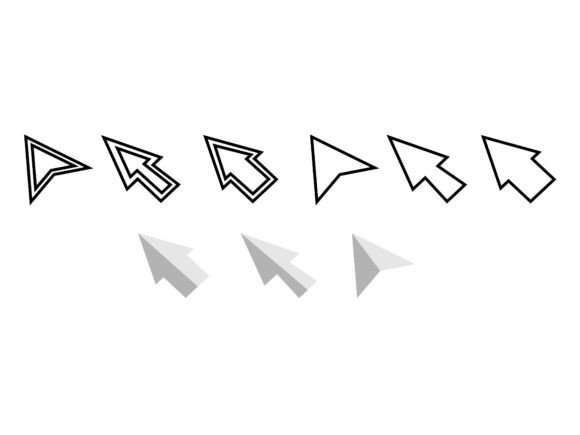
In the digital economy, visual consistency is not merely an aesthetic preference; it is a fundamental component of brand authority. Every element on a screen, from typography to iconography, communicates intent. Among these elements, the cursor is often overlooked, yet it serves as the primary point of interaction between the user and the interface. Integrating a curated Cursor Collection into your design ecosystem can subtly but significantly enhance user experience, reinforce brand identity, and elevate the perceived quality of your digital products.
This article explores the strategic application of a comprehensive cursor asset pack. We will examine how utilizing high-resolution, versatile vector and raster files can support broader business goals, improve operational efficiency for design teams, and create a more cohesive customer experience. The focus here is not on decoration, but on intentional design decisions that yield long-term value.
The Strategic Value of Micro-Interactions
Micro-interactions are the small, functional animations or visual cues that occur when a user interacts with a system. The cursor is the most persistent micro-interaction in desktop computing. When a user hovers over a clickable element, the change in cursor state provides immediate feedback. This feedback loop is critical for usability. However, beyond functionality, the style of the cursor contributes to the overall tone of the interface.
A generic system cursor suggests a standard, off-the-shelf experience. A custom cursor, when applied thoughtfully, signals attention to detail. For entrepreneurs and marketers, this distinction matters. It differentiates a premium product from a commodity. By deploying a Cursor Collection that aligns with your brand’s visual language, you extend your brand identity into the interactive layer of your website or application. This consistency builds trust. Users subconsciously associate polished details with reliability and professionalism.
Consider the decision-making process of a potential client evaluating two competing SaaS platforms. Both offer similar features. However, one platform employs a cohesive design system where even the cursor reflects the brand’s minimalist, modern aesthetic. The other uses default system arrows. The former feels more considered, more robust, and ultimately, more valuable. This is the power of holistic design strategy.
Technical Versatility and Workflow Efficiency
For designers, developers, and content creators, the technical specifications of assets directly impact workflow efficiency. A fragmented asset library leads to wasted time searching for compatible file types or resizing images without losing quality. The utility of a well-structured Cursor Collection lies in its comprehensive format coverage.
Receiving 9 PNG files at 300dpi ensures high-quality raster graphics suitable for web use where transparency is required. These files are ideal for quick implementation in CSS or HTML environments where vector support might be limited or where specific pixel-perfect rendering is needed at fixed sizes. The 300dpi resolution guarantees clarity on high-density displays, preventing pixelation that can detract from a premium feel.
However, modern web development increasingly relies on scalable vector graphics. The inclusion of 9 SVG files in both vertical and horizontal orientations addresses this need. SVGs are resolution-independent, meaning they scale perfectly across any device size, from mobile screens to 4K monitors. This versatility is crucial for responsive design. Furthermore, SVGs are code-based, allowing developers to manipulate their color and size via CSS, enabling dynamic theming and dark mode compatibility without creating multiple asset versions.
For professional design teams working in Adobe Illustrator or other vector-based software, the 1 EPS file and 1 AI file containing all designs are invaluable. These source files allow for deep customization. A brand manager might need to adjust the stroke width or modify the shape slightly to better fit a new logo update. Having access to the editable AI file means these adjustments can be made internally without relying on external designers, reducing costs and speeding up iteration cycles.
Finally, the 1 JPG file with all designs serves as a quick-reference catalog. This is particularly useful for project managers, clients, or stakeholders who need to review the available options without opening complex design software. It facilitates faster decision-making during the planning phase.
Intentional Implementation: When and How to Use Custom Cursors
While the availability of a Cursor Collection offers creative possibilities, its application requires strategic restraint. Not every digital property benefits from custom cursors. The key is alignment with user expectations and brand context.
- E-commerce and Luxury Brands: High-end fashion or luxury goods websites often use custom cursors to enhance the sense of exclusivity. A subtle, elegant cursor can mimic the feel of a physical boutique, guiding the user gently through the collection.
- Creative Portfolios: Designers, artists, and agencies can use expressive cursors to showcase personality. Here, the cursor becomes part of the narrative, demonstrating creativity and technical skill.
- Gaming and Entertainment: Immersive experiences benefit from thematic cursors that match the game’s universe, reinforcing the narrative environment.
Conversely, there are contexts where custom cursors may hinder rather than help. Accessibility is a paramount concern. Users with motor impairments or visual disabilities rely on standard cursor behaviors and visibility. If a custom cursor is too small, lacks contrast, or behaves unpredictably, it creates barriers. Therefore, before implementing a Cursor Collection, conduct accessibility audits. Ensure that the custom cursor maintains sufficient contrast against various backgrounds and that it reverts to standard system cursors when necessary for clarity.
Another consideration is performance. While SVGs are lightweight, poorly optimized PNGs or excessive JavaScript manipulation of cursor behavior can slow down page load times. In a world where seconds matter for conversion rates, technical optimization is non-negotiable. Use the provided SVGs for their efficiency, and ensure that any CSS or JavaScript associated with cursor changes is minified and asynchronous.
Risks of Unplanned Adoption
Adopting visual assets without a clear strategic framework can lead to brand dilution. A common mistake is using a Cursor Collection simply because it looks "cool," without considering whether it aligns with the brand’s core values. If your brand stands for simplicity and efficiency, a whimsical or overly complex cursor creates cognitive dissonance. Users may perceive the brand as unfocused or immature.
Furthermore, inconsistency is a significant risk. If the cursor style differs from the button styles, typography, and color palette, the interface feels disjointed. This fragmentation undermines the user’s confidence in the platform. To mitigate this, integrate the cursor design into your broader design system. Treat it as another component, subject to the same guidelines and review processes as your headers, footers, and call-to-action buttons.
There is also the risk of over-customization. Changing the cursor for every possible state (hover, click, drag, resize) can overwhelm the user. Stick to essential states. Use the 9 SVG files to cover primary interactions like default, pointer, and text selection. Avoid unnecessary animations that distract from the content. The goal is to support the user’s journey, not to interrupt it.
Long-Term Brand Equity and Operational Benefits
Investing in high-quality, versatile assets like a Cursor Collection contributes to long-term brand equity. Consistency over time builds recognition. When users encounter your brand across different touchpoints—website, web app, presentation decks—they experience a unified visual language. This repetition reinforces brand recall.
From an operational perspective, having a centralized, well-formatted asset pack reduces friction in content creation. Marketing teams can use the PNGs for social media graphics or email newsletters to maintain visual continuity. Educators and trainers can use the JPG overview to explain interface design principles. Freelancers can offer enhanced value to clients by providing a complete design system that includes interactive elements.
The availability of editable AI and EPS files future-proofs your investment. As design trends evolve, you can tweak the existing assets rather than purchasing new ones. This adaptability is crucial for businesses aiming for sustainability and cost-efficiency. Instead of discarding assets when a minor refresh is needed, you refine them. This approach aligns with lean operational principles, maximizing the return on every design dollar spent.
Making the Decision: A Framework for Adoption
Before integrating a Cursor Collection into your project, ask three strategic questions:
- Does this enhance usability or merely decorate? If the cursor improves clarity or reinforces brand identity without sacrificing function, it is a valid addition. If it confuses the user, discard it.
- Is it technically sustainable? Can your development team implement the SVGs efficiently? Will it impact load times? Ensure that the technical execution matches the design ambition.
- Does it align with our brand voice? Review the cursor styles against your brand guidelines. Do they reflect the tone you wish to convey? If your brand is serious and corporate, choose minimalist designs. If it is playful, you may opt for more expressive shapes.
By approaching the Cursor Collection with this level of scrutiny, you transform a simple asset pack into a strategic tool. You move beyond random decoration to intentional design. This shift is what separates amateur efforts from professional, results-driven digital strategies.
In conclusion, the value of the Cursor Collection—with its mix of PNG, SVG, EPS, AI, and JPG formats—lies not just in the files themselves, but in how they are deployed. When used with purpose, these assets support clearer communication, stronger branding, and more efficient workflows. They enable creators and businesses to craft digital experiences that are not only functional but also memorable and distinct. In a crowded digital landscape, these distinctions accumulate, forming the foundation of lasting competitive advantage.