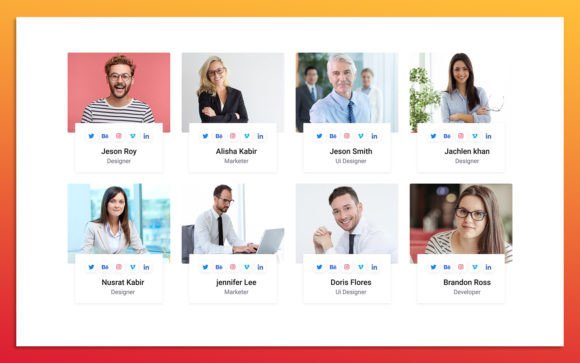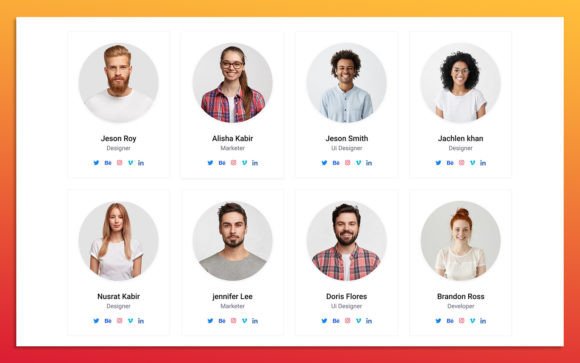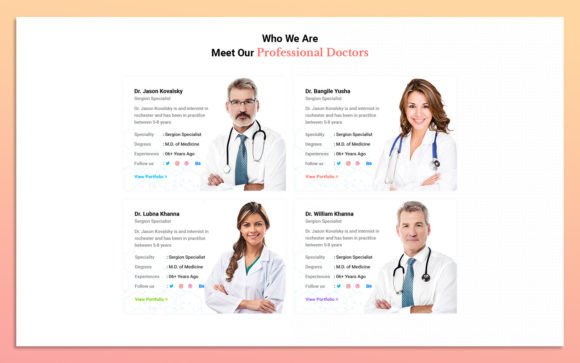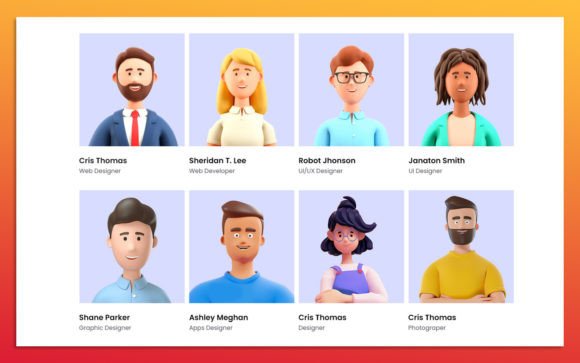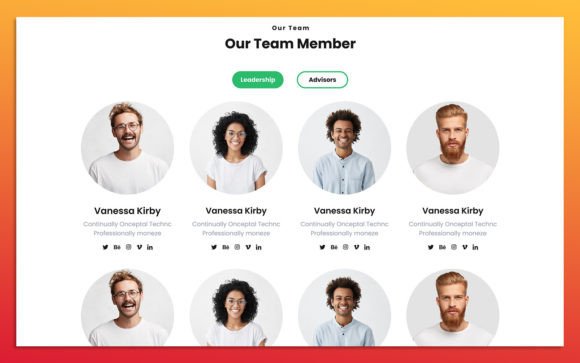
12 Team Member UI Elements for Modern Web Design
Presenting a team on a website is more than just listing names and job titles. It is an exercise in building trust, establishing brand personality, and humanizing a digital presence. For designers, developers, and business owners, the challenge often lies not in the concept but in the execution. Creating consistent, responsive, and visually appealing team sections from scratch can consume valuable hours that could be better spent on strategy or content creation. This is where a specialized resource like the 12 Team Member Ui Elements becomes an essential asset in your design toolkit.
This collection is part of a broader Team Member Widget Design for Web-UI Kit, specifically engineered to streamline the process of showcasing personnel. Built entirely in Figma, these elements are not static images but fully editable, scalable components. They offer a foundation that balances aesthetic appeal with functional flexibility, allowing you to adapt the design to fit any brand identity without starting from a blank canvas.
Accelerating the Design Workflow
Time is a non-renewable resource in web development. When you are working on a tight deadline for a client launch or updating your own company site, efficiency is paramount. The primary value of using pre-built 12 Team Member Ui Elements is the significant reduction in production time. Instead of spending hours aligning grids, selecting typography pairings, and ensuring responsive behavior across different screen sizes, you can deploy these widgets immediately.
Consider the typical workflow: a designer creates a layout, tests it on mobile, adjusts padding, checks contrast ratios, and then repeats the process for every variation. With this UI kit, those steps are already completed. The layers are fully organized, meaning you can dive straight into customization. You might need to swap out placeholder images for actual headshots and update the text fields, but the structural integrity remains intact. This allows freelancers and agencies to deliver high-quality results faster, improving overall project profitability.
Customization Without Complexity
A common concern with templates is rigidity. Many pre-made designs look impressive in previews but fail when applied to real-world brands with specific color palettes and typography requirements. The Team Member Widget Design for Web-UI Kit addresses this by prioritizing editability. Because the source file format is Figma, you have access to every vector path, color code, and text layer.
You can easily change color styles to match your brand guidelines. If your company uses a specific shade of navy blue and a warm gray, you can update the global styles in Figma, and the changes will reflect across all twelve elements instantly. This consistency is crucial for maintaining a professional appearance. Furthermore, the elements are 100% scalable. Whether you need a small thumbnail for a sidebar widget or a large featured profile for an "About Us" page, the vectors retain their crispness. This scalability ensures that your design looks sharp on retina displays and standard screens alike.
The Power of Organized Layers
For anyone who has opened a poorly constructed design file, the importance of organization cannot be overstated. Messy layers lead to errors, frustration, and wasted time. This UI kit features fully organized layers, grouped logically by component and state. Naming conventions are clear, making it easy for multiple team members to collaborate on the same file. If a developer needs to inspect spacing values or export assets, they can do so without hunting through unnamed groups. This level of hygiene in the file structure supports smoother handoffs between design and development teams.
Enhancing Brand Credibility Through Design
First impressions are formed in milliseconds. A cluttered or inconsistent team section can inadvertently signal a lack of attention to detail, potentially undermining trust in your services. Conversely, a clean, modern design communicates professionalism and competence. The 12 Team Member Ui Elements are designed with a simple, clean, and modern aesthetic that aligns with current web standards. This minimalism ensures that the focus remains on the people, not the decoration.
By using Google Fonts, the kit ensures typographic reliability. These fonts are widely supported, load quickly, and offer excellent readability across devices. When you integrate these elements into your site, you are leveraging established design principles that enhance user experience. Visitors can easily scan profiles, understand roles, and feel a connection to the team. This clarity supports better communication and helps potential clients or partners feel more comfortable reaching out.
Versatility for Diverse Use Cases
Who benefits most from this resource? The answer is broad because the need for team presentation is universal. Entrepreneurs launching a startup can use these widgets to introduce their founding team, highlighting expertise and vision. Marketing agencies can showcase their creative directors and strategists to demonstrate depth of talent. Educators and consultants can present their credentials in a way that feels approachable yet authoritative.
Each of the twelve elements offers a slightly different layout or emphasis. Some may prioritize social media links, which is ideal for influencers or public-facing roles. Others might focus on bio text, suitable for technical experts or executives with extensive backgrounds. This variety allows you to mix and match based on the hierarchy of your team. You are not forced into a one-size-fits-all grid; instead, you can curate a dynamic layout that reflects the unique structure of your organization.
Practical Implementation Tips
To get the most out of these elements, consider the context in which they will appear. If your website has a dark mode, take advantage of the easy color customization to invert the scheme appropriately. Ensure that the images you upload are of consistent quality and lighting. Even the best UI element cannot compensate for poor photography. Use the scalable nature of the vectors to test how the elements behave in different containers—sidebars, footers, or full-width sections.
It is also worth noting that while these elements provide a strong starting point, they are not a substitute for thoughtful content. The design facilitates the message, but the words and images must still convey authenticity. Use the space provided to write concise, engaging bios that highlight not just job titles, but personal interests or professional philosophies. This human touch, combined with a polished interface, creates a compelling narrative.
Making Informed Design Decisions
While the Team Member Widget Design for Web-UI Kit offers substantial advantages, it is important to assess fit. If your brand requires highly unconventional, artistic layouts that break standard grid systems, you may need to modify these elements significantly. However, for most professional websites, the balance of structure and flexibility provided here is ideal. It removes the guesswork from basic layout decisions, allowing you to focus on higher-level creative challenges.
Additionally, because the file is built in Figma, it integrates seamlessly with modern design workflows. You can prototype interactions, share links with stakeholders for feedback, and export CSS code directly for developers. This connectivity reduces friction in the production pipeline. For small business owners without a dedicated design team, the intuitive nature of Figma means they can make minor adjustments themselves, reducing reliance on external contractors for simple updates.
In conclusion, incorporating the 12 Team Member Ui Elements into your web design process is a strategic move toward greater efficiency and visual consistency. It empowers you to present your team with clarity and style, supporting your broader goals of building trust and engaging your audience. By leveraging a tool that is both powerful and easy to use, you free up resources to focus on what truly matters: growing your business and connecting with your community.