Mastering the Team Member Widget: Design Essentials for Modern Web UI Kits
In the rapidly evolving landscape of web design, first impressions are often formed within milliseconds. Among the various elements that contribute to a website's credibility and aesthetic appeal, the Team Member Widget plays a pivotal role. It is not merely a static list of names and faces; it is a dynamic bridge between a brand and its audience, humanizing digital interactions and fostering trust. For designers, developers, and business owners alike, understanding the nuances of this component is essential for creating engaging user experiences. This article explores the design elements of team member widgets, specifically focusing on their integration into modern Web-UI kits, and highlights why customizable, scalable, and easy-to-use templates are indispensable tools in today’s digital toolkit.
The Strategic Importance of Team Presentation
Before diving into the technical aspects of design, it is crucial to understand why team member widgets matter. In an era where remote work and digital-first businesses are the norm, potential clients and customers rarely meet company representatives in person. The "About Us" or "Our Team" page often serves as the primary point of connection. A well-designed widget does more than display headshots; it communicates professionalism, transparency, and approachability.
When users see real people behind a brand, their willingness to engage increases. This psychological effect, known as the humanization of technology, is critical for conversion rates. Whether you are running an e-commerce store, a SaaS platform, or a creative agency, showcasing your team effectively can differentiate you from competitors who rely on generic stock imagery or poorly structured layouts. Therefore, the design of these widgets must be intentional, clean, and aligned with the overall brand identity.
Core Design Elements of Effective Widgets
A high-quality Team Member Widget is built on several foundational design principles. These elements ensure that the information is not only visible but also digestible and visually appealing. When evaluating or creating a widget for a Web-UI kit, consider the following components:
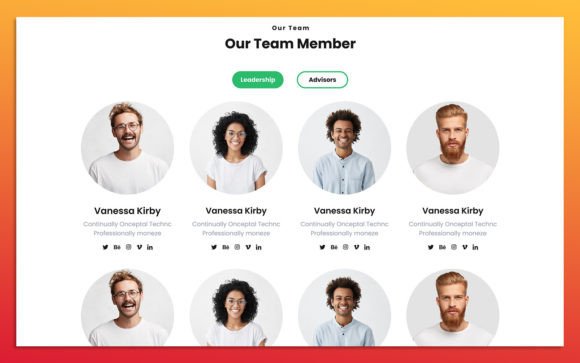
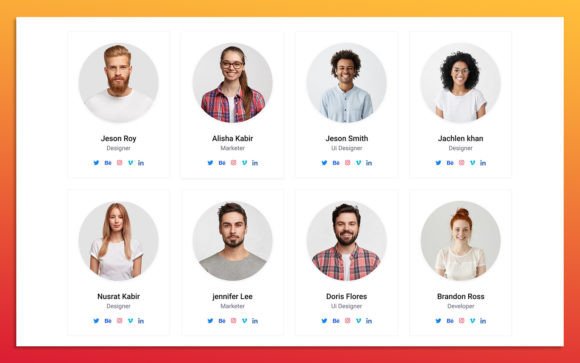
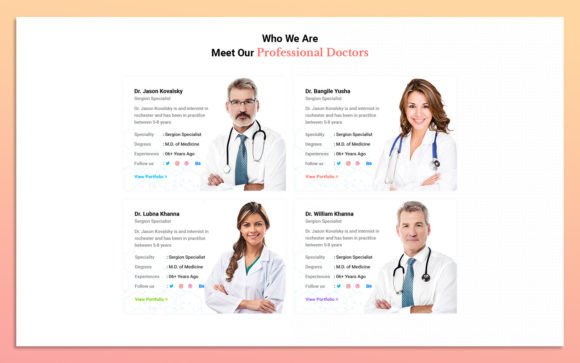
- Visual Hierarchy: The layout should guide the viewer’s eye naturally. Typically, the image is the focal point, followed by the name, job title, and then social media links or a brief bio. Proper spacing and typography weights are essential here.
- Imagery Quality: High-resolution, consistent photography is non-negotiable. Images should be uniform in style, lighting, and background to maintain a cohesive look. This is where scalability becomes important; images must remain crisp regardless of the screen size.
- Typography and Readability: Using standard, web-safe fonts like Google Fonts ensures that text renders correctly across different browsers and devices. Clean, sans-serif typefaces often work best for modern designs, offering clarity and a contemporary feel.
- Interactive States: Modern web design expects interactivity. Hover effects—such as color changes, slight zooms on images, or the appearance of social icons—add a layer of engagement without cluttering the initial view.
The Power of Customizable Web-UI Kits
For many designers, starting from scratch is time-consuming and inefficient. This is where pre-built Web-UI Kits become invaluable. A UI kit is a collection of reusable components, such as buttons, forms, and widgets, that accelerate the design process. However, not all kits are created equal. The most effective kits offer flexibility, allowing users to tailor components to their specific needs without compromising quality.
When selecting a Team Member Widget template, ease of use and customizability are paramount. A superior template allows you to change color styles and images effortlessly. This flexibility is crucial because every brand has unique guidelines. A one-size-fits-all approach rarely works in professional web design. Instead, designers need tools that adapt to their vision. For instance, being able to switch from a corporate blue palette to a vibrant startup orange with just a few clicks saves hours of manual adjustment.
Scalability and Editability in Photoshop
One of the standout features of premium UI kits is their foundation in professional software like Adobe Photoshop. While web development ultimately happens in code, the design phase often begins in graphic editing tools. A template that is 100% scalable and fully editable in Photoshop provides designers with complete control over every pixel.
Scalability ensures that assets look sharp on everything from mobile phones to 4K monitors. Vector-based elements or high-resolution smart objects allow for resizing without loss of quality. Furthermore, fully organized layers are a hallmark of professional design files. When layers are neatly named and grouped, navigating the file becomes intuitive. Designers can quickly isolate specific elements—such as a team member’s photo or a background shape—make adjustments, and export assets ready for development. This level of organization reduces errors and streamlines collaboration between designers and developers.
Practical Application: From Template to Live Site
Understanding the theory is one thing, but applying it is another. Let’s consider a practical scenario. Imagine a small marketing agency launching a new website. They purchase a modern Team Member Widget UI kit characterized by a simple, clean design. Here is how they might leverage its features:
- Initial Setup: The designer opens the Photoshop source file. Thanks to the fully organized layers, they immediately locate the "Team Grid" group.
- Brand Alignment: Using the adjustable color styles, they replace the default accent colors with their brand’s primary hex codes. This ensures visual consistency across the site.
- Content Integration: They swap out the placeholder images with professional headshots of their staff. Because the template is scalable, they ensure each photo is cropped uniformly to fit the designated frames perfectly.
- Typography Adjustment: They select a font from Google Fonts that matches their brand voice—perhaps a bold header font paired with a lightweight body font—and apply it to the name and title fields.
- Export and Development: Once satisfied, they export the assets. The developer then uses these designs as a blueprint to code the responsive HTML/CSS, ensuring the hover effects and layout behave as intended on live browsers.
This workflow demonstrates how a well-designed UI kit bridges the gap between concept and execution. It empowers teams to produce high-quality results quickly, even if they do not have extensive coding expertise at the design stage.
Common Misconceptions About UI Templates
Despite their benefits, some beginners hesitate to use UI kits, fearing that their websites will look generic. This is a common misunderstanding. While templates provide a structure, they are merely a starting point. The true uniqueness comes from how you customize them. By altering colors, typography, imagery, and spacing, you can transform a standard widget into a bespoke element that reflects your brand’s personality.
Another misconception is that using Photoshop templates is outdated in a world of browser-based design tools like Figma or Sketch. While these tools are popular, Photoshop remains an industry standard for detailed image manipulation and complex layer management. Many professional workflows still rely on Photoshop for asset creation before moving to code or other prototyping tools. Therefore, having access to high-quality Photoshop source files remains a significant advantage.
Conclusion: Elevating Your Web Presence
In conclusion, the Team Member Widget is a critical component of modern web design, serving as a vital touchpoint for user trust and engagement. By leveraging high-quality, customizable Web-UI kits, designers and business owners can create professional, visually appealing team sections without starting from scratch. Key features such as simple and clean designs, fully organized Photoshop layers, scalability, and compatibility with Google Fonts ensure that these templates are not only easy to use but also adaptable to any brand identity.
Whether you are a seasoned designer looking to streamline your workflow or a beginner aiming to build a credible online presence, investing in versatile design elements pays dividends. Remember, the goal is not just to display information, but to create a connection. With the right tools and a clear understanding of design principles, you can transform your team page from a simple list into a compelling narrative that resonates with your audience. Embrace the flexibility of modern UI kits, and let your team’s personality shine through every pixel.