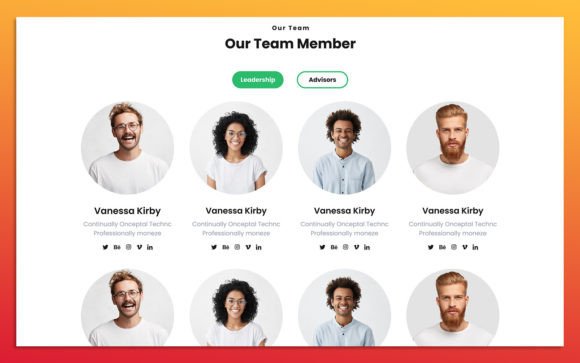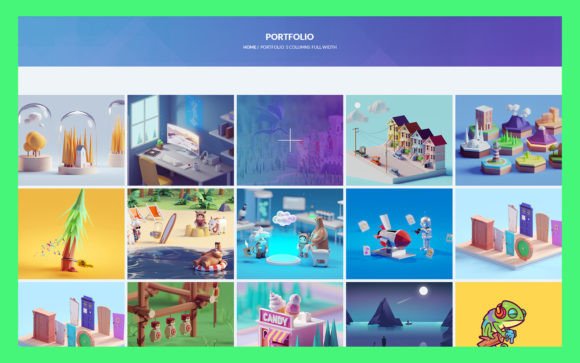
23 Portfolio UI Elements for Modern Design
In the fast-paced digital landscape, first impressions are not just important; they are everything. For designers, developers, and creative entrepreneurs, a portfolio is more than a collection of past work—it is a direct reflection of professional identity and capability. However, building a compelling online presence from scratch can be time-consuming and technically demanding. This is where 23 Portfolio UI Elements steps in as a vital resource. Designed with flexibility and ease of use in mind, this toolkit offers a streamlined approach to creating high-quality, professional-grade interfaces without the steep learning curve associated with custom coding or complex design systems.
Streamlining the Design Process
The core value proposition of 23 Portfolio UI Elements lies in its simplicity. Many designers find themselves stuck in the "blank canvas" phase, spending hours arranging basic components before they even begin showcasing their actual work. This pre-designed set eliminates that friction. By providing a robust foundation of essential user interface components, it allows creators to jump straight into customization and content placement. The elements are crafted to be intuitive, ensuring that whether you are a seasoned UX designer or a freelancer expanding into web design, the workflow remains smooth and efficient.
One of the standout features is the fully organized layer structure within the source files. When working in Adobe Photoshop, navigating through hundreds of unnamed layers can be a nightmare. This kit prioritizes clarity, with logical grouping and naming conventions that make editing straightforward. You can toggle visibility, adjust positioning, and modify assets without hunting for specific elements. This level of organization significantly reduces production time, allowing for rapid prototyping and quicker client approvals.
Customization and Visual Flexibility
A static template is rarely useful in today’s diverse branding environment. Clients and personal brands require unique visual identities, which is why 23 Portfolio UI Elements is built for extensive customization. The design philosophy centers on a clean, modern aesthetic that serves as a neutral yet sophisticated backdrop for your content. Because the style is understated, it adapts seamlessly to various color palettes and typographic choices.
Changing the color style is incredibly simple. Whether you need to match a corporate brand guide with specific hex codes or create a vibrant, high-contrast look for a creative agency, the PSD files allow for quick global adjustments. The use of RGB color mode ensures that what you see on screen is exactly what will appear in digital environments, maintaining color fidelity across devices. Furthermore, the integration of Google Fonts means you are not limited to standard system fonts. You can easily swap in contemporary typefaces that enhance readability and align with current web design trends, ensuring your portfolio looks fresh and relevant.
Key Characteristics at a Glance
- Fully Editable PSD Files: Complete control over every pixel and element.
- Organized Layers: Saves time during the editing and export process.
- Modern Aesthetic: Clean lines and ample whitespace for a professional look.
- Easy Color Customization: Adapt quickly to any brand identity.
- Google Fonts Integration: Access to a vast library of web-safe typography.
Practical Applications Across Industries
The versatility of 23 Portfolio UI Elements makes it suitable for a wide range of users beyond just graphic designers. Consider the freelance photographer who needs a minimalist gallery layout to let images speak for themselves. The clean UI elements provide the necessary structure without distracting from the photography. Similarly, a software developer can use these components to build a case-study-heavy portfolio that highlights technical skills and project outcomes in a readable, structured format.
For marketing professionals and entrepreneurs, this toolkit offers a way to present services and past campaigns with clarity. The modular nature of the elements allows for the creation of distinct sections for testimonials, service lists, and contact forms. This modularity is crucial for creating landing pages that convert visitors into clients. Educators and bloggers can also benefit by using these UI patterns to organize course materials or article archives, improving the overall user experience for their audience.
In a commercial context, agencies often face tight deadlines when pitching new business. Having a reliable set of UI elements allows teams to mock up potential website designs for clients rapidly. Instead of starting from zero, designers can assemble a cohesive preview using the 23 elements, demonstrating concept and direction efficiently. This speed-to-market advantage can be a decisive factor in winning contracts.
Enhancing User Experience and Engagement
Good design is invisible; it facilitates interaction without drawing attention to itself. The elements included in this pack are designed with user experience (UX) best practices in mind. Navigation menus are clear, call-to-action buttons are prominent yet unobtrusive, and content hierarchies are established through thoughtful spacing and typography. These subtle cues guide the visitor through the portfolio, encouraging them to explore more work and ultimately get in touch.
By using a standardized set of UI components, you also ensure consistency across your site. Consistency builds trust. When buttons, headers, and footers behave and look the same on every page, users feel more comfortable navigating the site. 23 Portfolio UI Elements helps maintain this consistency effortlessly, as each component is designed to work harmoniously with the others. This cohesion contributes to a polished, professional appearance that reflects well on the brand or individual behind the screen.
Making the Most of the Toolkit
To get the most out of 23 Portfolio UI Elements, start by defining your content strategy before diving into the design. Know what projects you want to highlight and what message you want to convey. Once you have your content ready, open the PSD file and begin mapping your content to the available elements. Take advantage of the organized layers to experiment with different layouts. Try moving sections around, changing background colors, or swapping out icons to see what feels right for your brand.
It is also recommended to pay attention to whitespace. The modern design of these elements relies heavily on breathing room between components. Resist the urge to clutter the interface with too much information. Let the clean design do the heavy lifting. Additionally, since the files are in RGB format, always preview your designs on multiple screens if possible to ensure colors appear as intended. While Google Fonts are web-ready, consider loading times and fallback options when implementing the final design on a live website.
Ultimately, 23 Portfolio UI Elements is more than just a download; it is a productivity tool that empowers creators to focus on what matters most: their work. By handling the structural and aesthetic heavy lifting, it frees up mental energy for creativity and strategy. Whether you are updating an existing site or launching a new personal brand, this toolkit provides the reliable, customizable foundation needed to succeed in the digital space.